We accept payment through Wise, a payment service built for sending money across countries quickly, without the fees and delays of a normal bank wire. Below is everything you need: why we use it, how to add us as a recipient, and every detail you will be asked for.
PAYMENTS POWERED BY
40+ countries regulated
16 million+ customers worldwide
Real mid market rate
Bank level security
Why we use Wise
Regular international bank transfers usually pass through two or three middlemen banks before the money ever reaches us, and each one quietly takes a cut through a marked up exchange rate. Wise skips all of that. It moves your money directly, converts it at the real exchange rate you would see on Google, and shows the full fee upfront before you send a single rupee.
No Hidden MarkupYou see the exact rate and fee before sending. No surprise deductions once the money lands.
Fast TransfersMost payments arrive within a day, sometimes within minutes, instead of the usual week long wait.
Regulated and SafeWise is authorised and regulated by financial authorities in the UK, the US, the EU, and beyond.
Built for This Exact CasePaying an individual instructor abroad, in their local currency, is literally what Wise was designed for.
We have used Wise for a long timeThis is not a new or untested setup. We have been receiving payments through Wise from students across multiple countries for a long time now, without a single failed or lost transfer. It is the same account, the same details, used consistently.
How to add us as a recipient
Open the Wise app or website, then follow these steps. It takes about two minutes the first time and is saved for every payment after that.
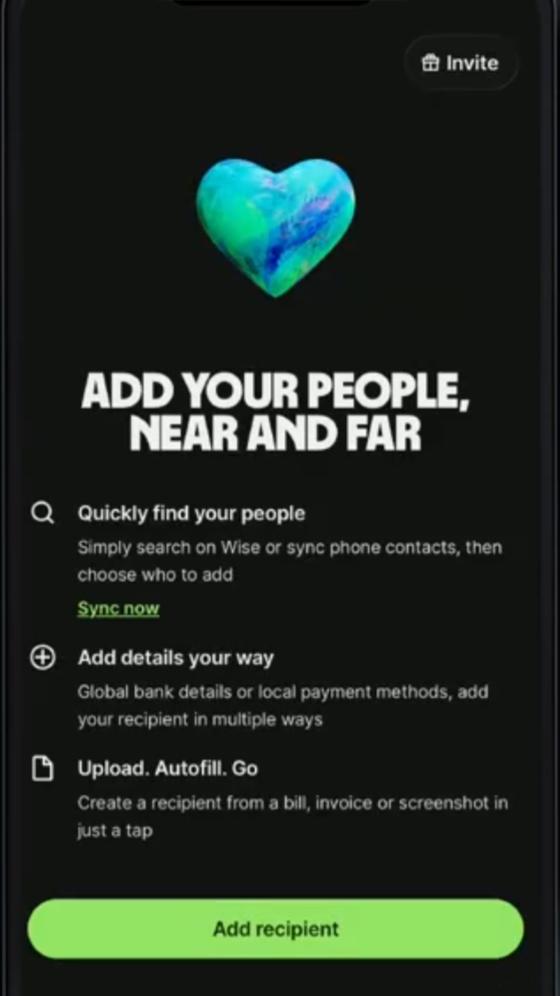
Open Wise and tap "Add recipient"Inside the Wise app, go to your recipients list and start adding someone new. This is the very first screen you will see.
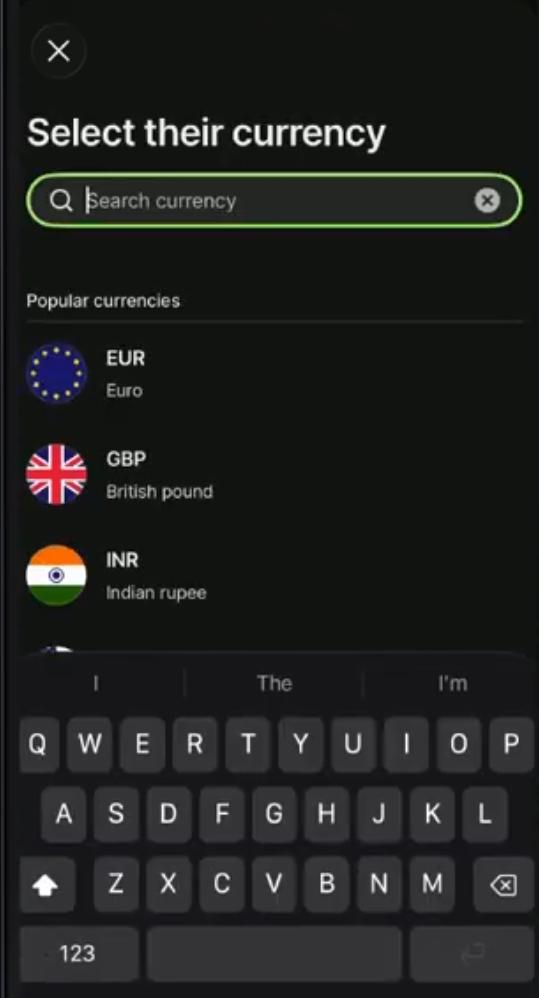
Select their currency: INRSearch for India in the currency list and choose INR, the Indian Rupee. This tells Wise where the money is going and unlocks the local payment methods available for that country.
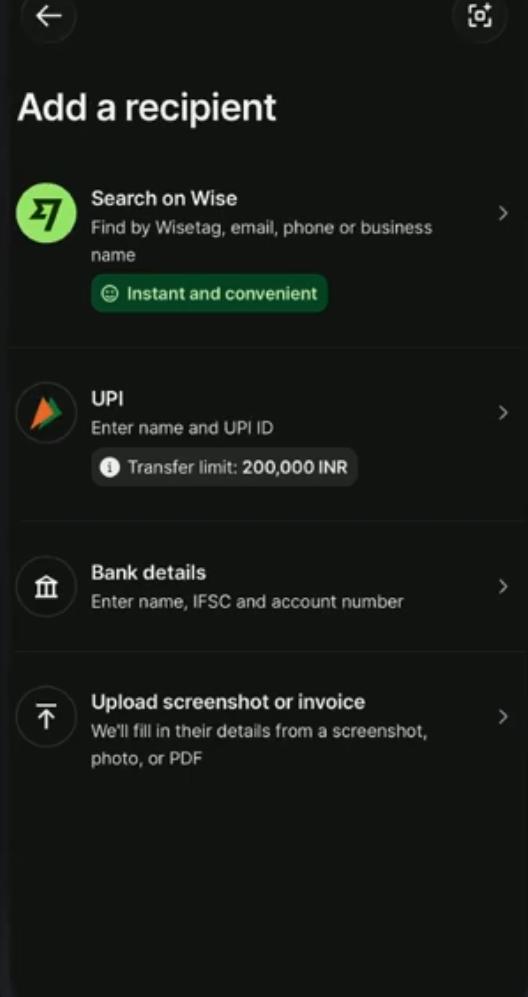
Choose "UPI", our recommended methodOnce INR is selected, you will see a few options such as Search on Wise, UPI, Bank details, and Upload screenshot or invoice. Select UPI, enter name and UPI ID. It is the fastest and simplest option for us.
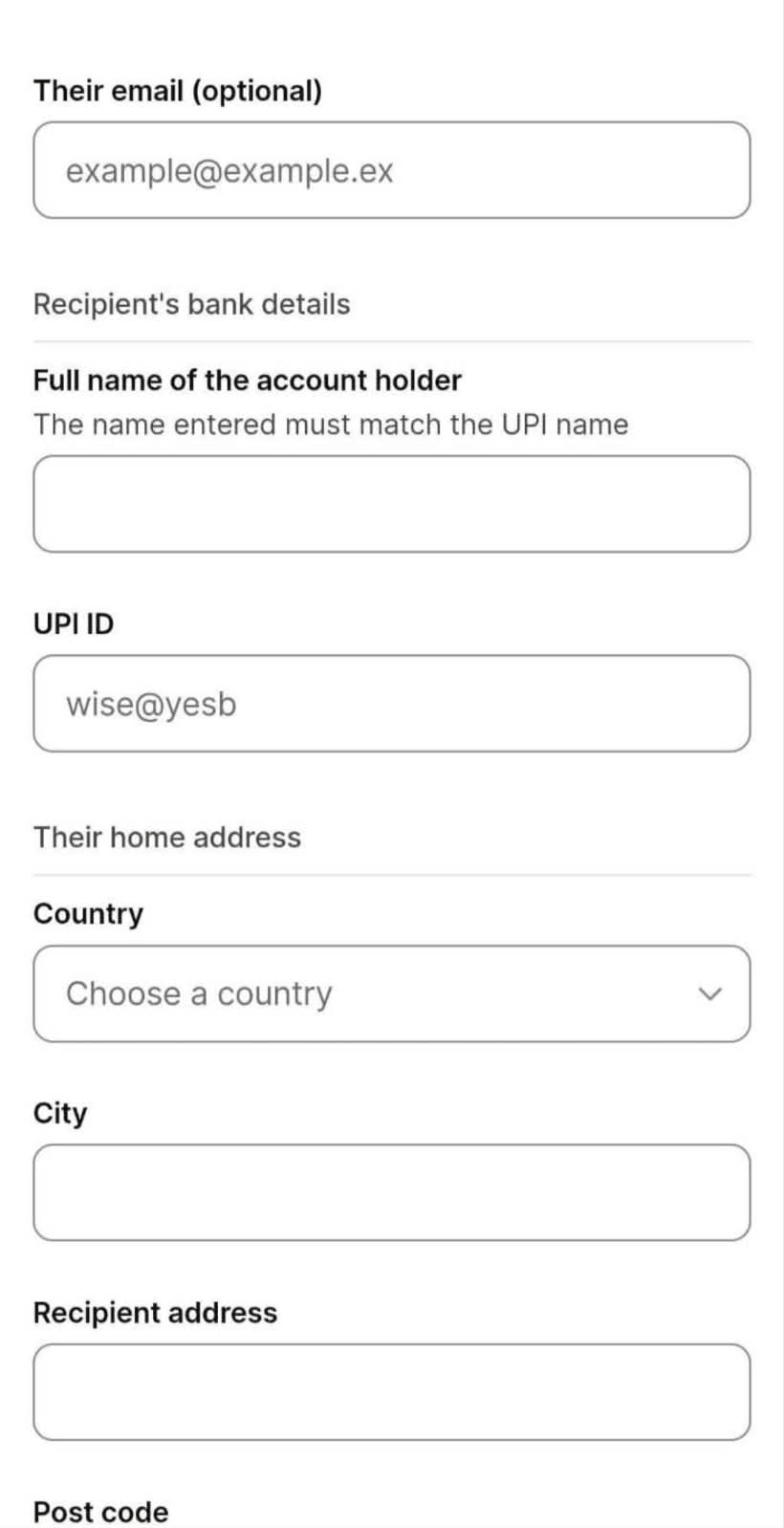
Enter the email, name, UPI ID, and addressCopy each field from the payment details card below directly into the matching field in the Wise form, including the home address section.
Review and confirmDouble check the amount and the recipient details, then send. You will get a confirmation and a tracking status inside the app.
Prefer a direct bank transfer instead? Choose "Bank details" in the same menu and use the account number, IFSC, and bank name from the card below. It works just as well, UPI is simply faster and easier to fill in.
Your payment details
Copy any field with one tap using the button next to it.
Recipient
Full name of the account holder
Gatik Panicker
Email (optional field on Wise)
panickergatik3@gmail.com
Recipient country
India
Currency
INR
UPI Recommended
UPI ID
panickergatik3@oksbi
Bank Transfer Secondary option
Bank
Kotak Mahindra Bank
Account number
6245503436
IFSC code
KKBK0001418
Home Address
City
Mumbai
Recipient address
A 1503 Palm Springs, Joyville, Virar, Maharashtra
Post code
401303
What happens after you pay
You do not need to send a screenshot or wait for a manual confirmation email from us. Once your payment lands, our system automatically detects it and updates your student dashboard on its own, whether that means your session plan, your invoice status, or your account moving from Demo to Active.
Automatic, not manualLog into your dashboard after paying and everything will already reflect the update. If a change has not shown up within a reasonable amount of time, feel free to message us directly and we will check it right away.
Common questions
Why does it say Gatik Panicker and not OKPHX Guitar Lessons?
OKPHX Guitar Lessons is the name of the teaching business, but it operates as an individual, not a separately registered company with its own bank account. Every bank and every payment provider, Wise included, requires the account holder's name to match their government issued ID exactly. Gatik Panicker is the person behind OKPHX, and the account is his in his legal name, which is completely normal for an individually run business anywhere in the world.
Why a personal Gmail address instead of an official OKPHX email?
The email asked for on the recipient form is not a business requirement, it is simply the email address linked to the Wise account itself, used for transfer notifications and receipts. Since this is an individual Wise account rather than a registered business account, it is tied to a personal email the same way a personal bank account would be. It has no effect on where the money goes or how safely it arrives, it is purely how Wise sends its confirmation emails.
Is it safe to send these details on Wise?
Yes. This is exactly the information any recipient would need to provide for an international transfer, whether that is a business, a freelancer, or an individual. None of it allows anyone to withdraw money from the account, it only allows money to be sent into it, which is how bank and UPI transfers work everywhere.
A direct card payment option is coming
To make this even smoother, we are currently working on our own integrated international payment gateway so students will eventually be able to pay directly through the website in a single click, in their own currency, with no extra app required. Wise remains fully supported in the meantime.
 OKPHX